

Description
Smart Booking is a completely free WordPress booking plugin built specifically for consultation-style appointments tied to a person (a staff member). It is designed for use cases such as lawyers, certified professionals, marriage agencies, chiropractic clinics, and tutoring schools.
Key Features
- Completely free, no limits — There is no Pro version, no paid add-ons, and no license activation. Every feature is free.
- Ready in 5 minutes — Activating the plugin auto-creates a default store, staff member, and the three core fields (name, email, phone). Just paste the
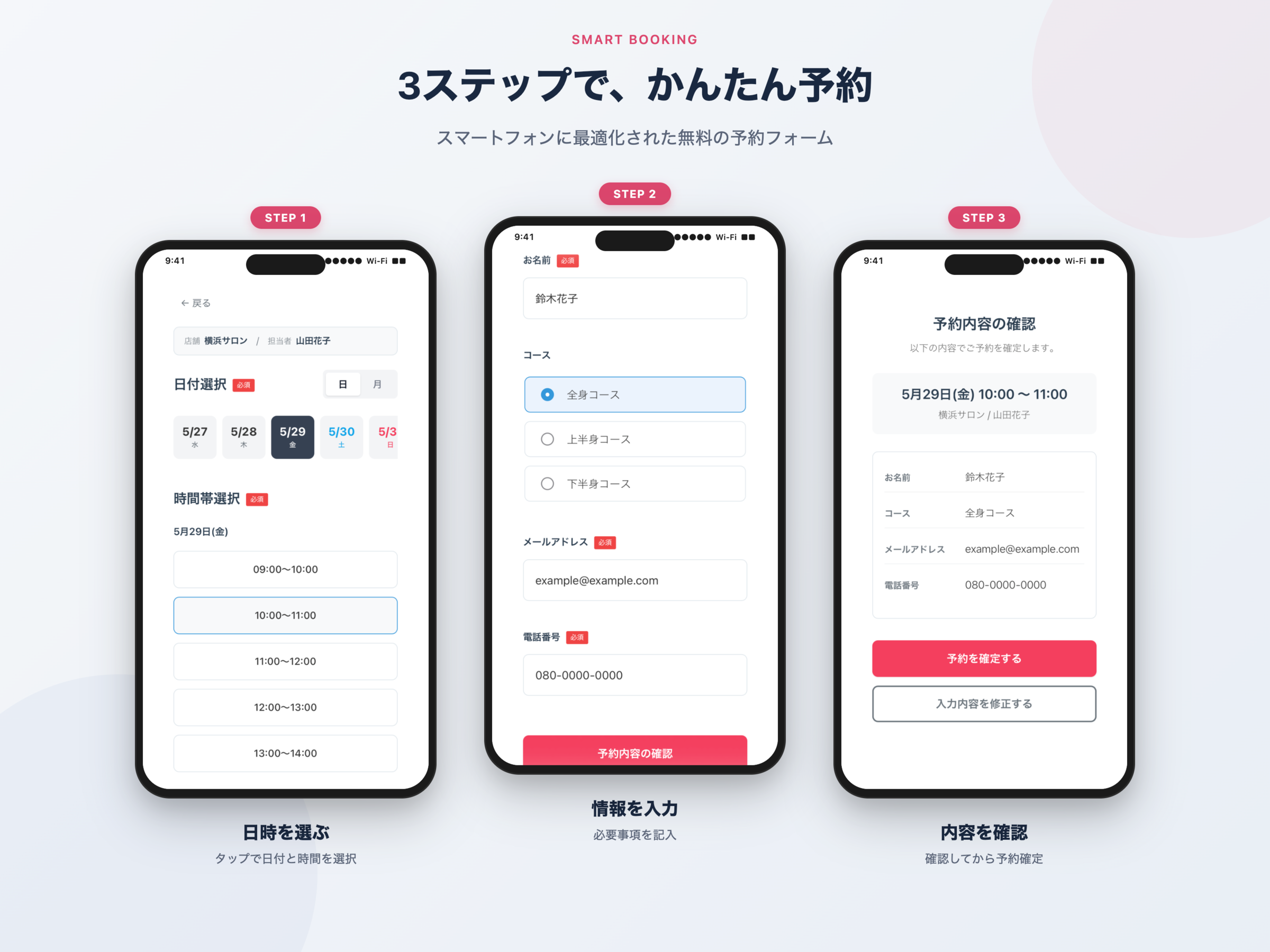
[smart_booking]shortcode into a post or page to display the booking form. - Optimized for the Japanese booking flow — A 3-step flow (“input confirmation done”) that lets the customer review their entries on a dedicated confirmation screen before finalizing the booking.
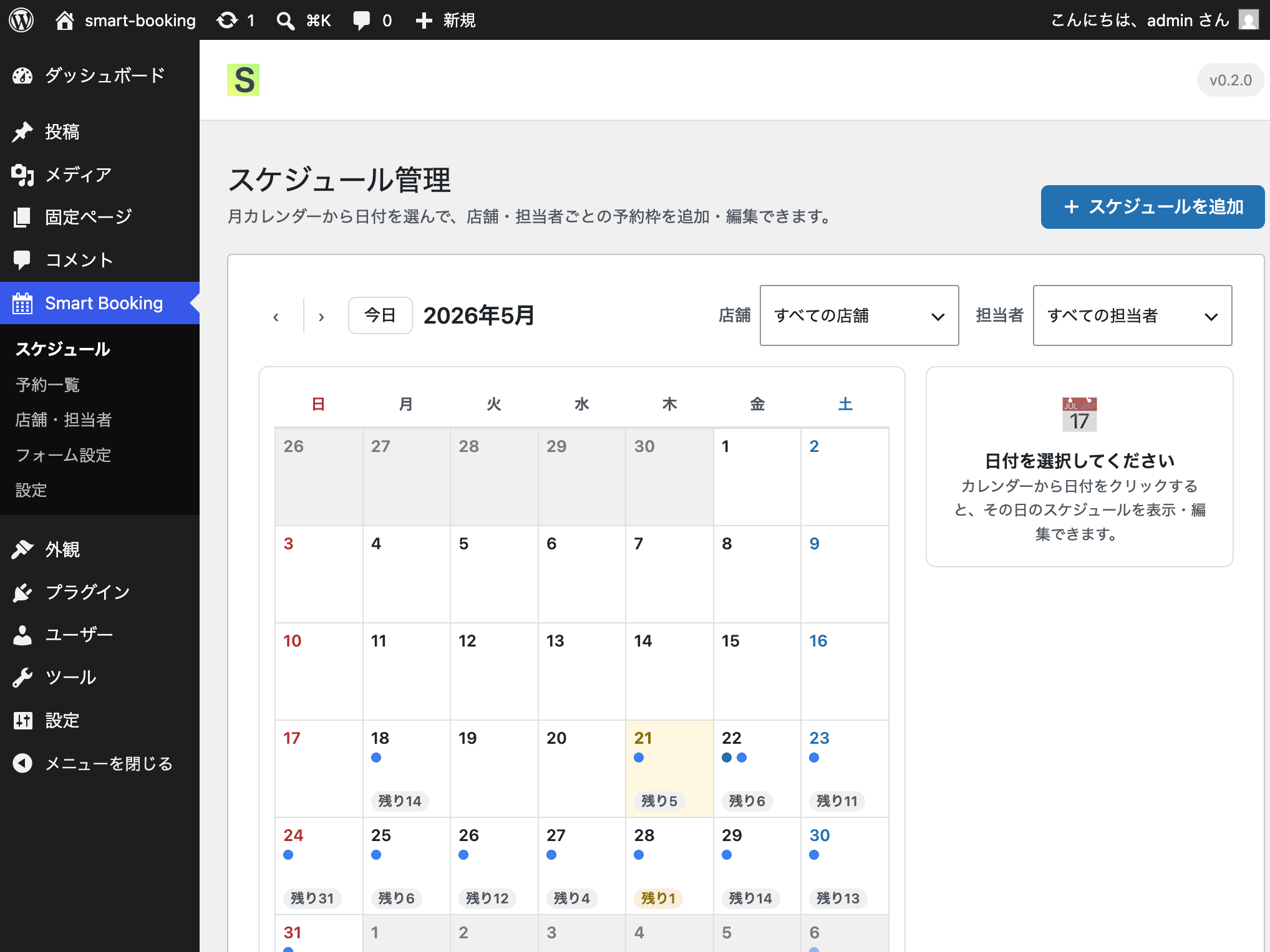
- Multi-store / multi-staff management — Manage schedules per store and per staff member. Whether the store-select and staff-select steps are shown to customers is automatically decided by how many active records exist (skipped when there is only one).
- Flexible schedule configuration — Time slots in 30 / 60 / 90 / 120-minute units, capacity per slot, weekday-pattern bulk copy, and an option to overwrite existing schedules.
- Calendar display modes — Choose between day view (horizontal scroll), month view (calendar grid), or a toggle between both, configurable from the admin screen.
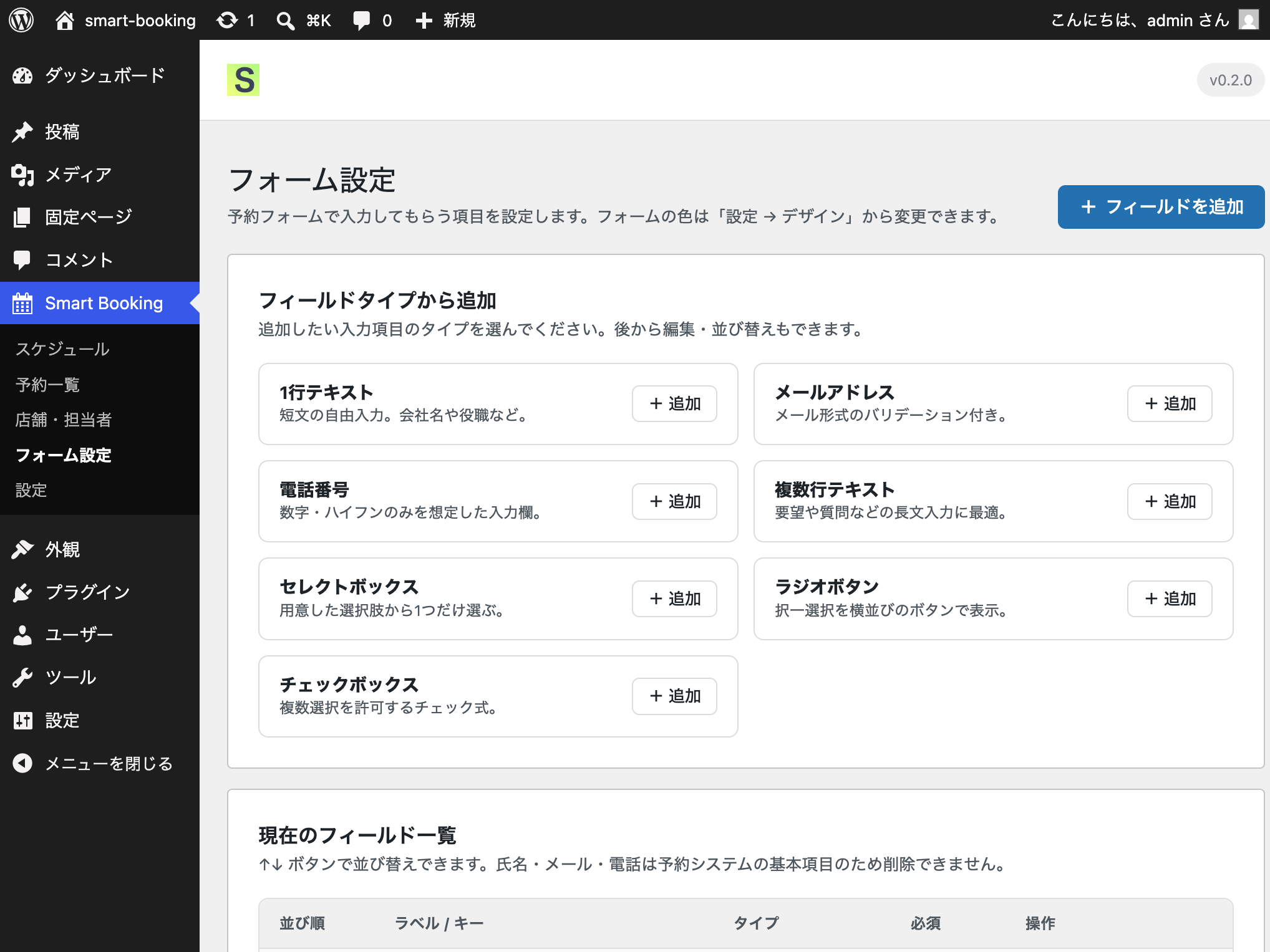
- Custom fields — In addition to the three built-in fields (name, email, phone), administrators can add text, email, phone, textarea, select, radio, and checkbox fields.
- Email notifications — Automatic emails are sent to the customer and the administrator when a booking is received, and a confirmation email is sent to the customer on approval. All templates are editable from the admin screen.
- Design customization — Button color, date-selection color, time-slot color, required-mark color, and focus color are all configurable from the admin screen.
- Concurrent booking protection — Capacity is enforced through a single atomic SQL UPDATE, preventing double-bookings when multiple users submit at the same moment.
- Google Tag Manager (GTM) integration — Each booking step (
store_select,staff_select,date_select,time_select,form_input,confirm,complete) is automatically pushed towindow.dataLayer, so you can wire up GA4 funnels and Google Ads conversion tags through GTM without writing any code. The GTM container tag itself must be installed separately on your site. - WordPress.org guideline compliant — No external CDN scripts/styles, no PHP sessions, all queries use
$wpdb->prepare(), all output is escaped, and every REST endpoint enforces nonce +current_user_can('manage_options').
Supported booking flow
[Store Select] [Staff Select] [Date Select] [Time Select] [Form Input] [Confirmation] [Done]
The store-select and staff-select steps are shown only when more than one active store / staff record exists. With a single store and a single staff member, the customer starts directly from date selection.
Optional integrations (off by default)
The following external integrations are off by default. They only initiate any outbound traffic after an administrator explicitly enables them on the “Integrations” tab and provides the required credentials (API key, etc.).
- Google Calendar integration — Creates a calendar event when a booking is received and deletes it on cancellation.
- ChatWork notifications — Posts a notification message to a designated ChatWork room when a booking is received.
See the “External services” section below for full details.
Customization & feature requests
For feature requests and customization inquiries, please contact the developer, Liberdade Inc., or visit our service site at wp-smart-booking.com.
Source code
The complete source code, including the un-minified JavaScript and CSS sources under src/, is publicly available on GitHub:
https://github.com/KeisukeYokoyama/SmartBooking
External services
このプラグインは以下の外部サービスと通信する場合があります。いずれも、管理者が明示的に有効化・設定した場合にのみ外部への通信が発生します(Googleカレンダー連携とChatWork通知はデフォルトでオフで「設定 > 外部連携」タブでの有効化が必要です。郵便番号検索は管理者がフォームに「住所」フィールドを追加した場合にのみ動作します)。
Google Calendar API
- エンドポイント:
https://www.googleapis.com/calendar/v3/ - 目的: 予約受付時にGoogleカレンダーのイベントを作成し、予約キャンセル時にイベントを削除します。
- 送信データ: 予約日時、予約者名、店舗名、担当者名、予約番号。
- タイミング: 予約受付時(イベント作成)/予約キャンセル時(イベント削除)。
- 認証方式: サービスアカウントのJSONキー(管理者が設定画面でアップロード)。
- デフォルト: オフ
- 利用規約: Google APIs Terms of Service
- プライバシーポリシー: Google Privacy Policy
ChatWork API
- エンドポイント:
https://api.chatwork.com/v2/ - 目的: 予約受付時に、指定したChatWorkルームへ通知メッセージを投稿します。
- 送信データ: 予約者名、予約日時、店舗名、担当者名、予約番号。
- タイミング: 予約者が予約フォームを送信した直後。
- 認証方式: APIトークン(管理者が設定画面で入力)。
- デフォルト: オフ
- 利用規約: ChatWork Terms of Service
- プライバシーポリシー: ChatWork Privacy Policy
郵便番号検索API(zipcloud)
- エンドポイント:
https://zipcloud.ibsnet.co.jp/api/search - 目的: 予約フォームの「住所」フィールドで、入力された郵便番号から住所(都道府県・市区町村・町域)を自動補完します。
- 送信データ: 入力された郵便番号のみ。個人を特定する情報は送信しません。
- タイミング: 管理者がフォームに「住所」フィールドを追加し、郵便番号自動入力が有効(デフォルト)の状態で、予約者が郵便番号を7桁入力した時。
- デフォルト: 「住所」フィールドを追加しない限り、通信は一切発生しません。
- 利用規約: zipcloud API 利用規約
いずれの連携も有効化・設定されていない場合、Smart Booking は外部サービスへの通信を一切行いません。
Screenshots
Installation
- WordPress管理画面の「プラグイン > 新規追加」からプラグインのZIPをアップロードするか、アーカイブを
/wp-content/plugins/smart-bookingに展開します。 - 「プラグイン」画面から Smart Booking を有効化します。
- 有効化時に、デフォルトの店舗1つ・担当者1人と、3つのカスタムフィールド(氏名・メールアドレス・電話番号)が自動作成されます。
- 管理画面サイドバーの Smart Booking メニューから、店舗・担当者・スケジュール・フォーム項目を設定します。
- 投稿や固定ページに
[smart_booking]ショートコードを貼り付けて公開すると、予約フォームが表示されます。
特定の店舗に限定したフォームを表示するには、store_id 属性を指定します(例: [smart_booking store_id="1"])。
FAQ
-
本当に完全無料ですか?
-
はい。Pro版・有料アドオン・ライセンス認証は一切ありません。すべての機能を無料でご利用いただけます。
-
デフォルトの状態で外部への通信は発生しますか?
-
いいえ。初期状態では、Smart Booking はいかなる外部サービスにも接続しません。Googleカレンダー連携とChatWork通知は、管理者が「外部連携」タブで明示的に有効化し、必要なAPI認証情報を入力した場合にのみデータを送信します。
-
予約フォームはスマートフォンに対応していますか?
-
はい。フロントの予約フォーム、確認画面、完了画面はすべてレスポンシブ対応で、スマートフォン幅(375px)はもちろん、タブレット・デスクトップでの動作も確認済みです。
-
複数の予約者が同じ時間枠を同時に予約しようとした場合はどうなりますか?
-
予約可能数は1回のアトミックなSQL UPDATE文で管理されるため、枠の定員を超える予約は受け付けられません。ページ読み込みから送信までの間に枠が埋まった場合、予約は成立せず、ユーザーにはエラーメッセージが表示されます。
-
毎週の繰り返しスケジュールを一括で設定できますか?
-
はい。スケジュール管理画面で「スケジュールをコピー」「パターン」を選び、曜日(日〜土)と期間を指定すると、該当するすべての日付にスケジュールが複製されます。既存スケジュールを上書きするかどうかも選択できます。
-
予約者は自分で予約をキャンセルできますか?
-
v1では、予約者側からのキャンセル機能はありません。電話やメールでキャンセルの連絡を受けた後、管理画面の予約一覧からステータスを「キャンセル」に変更してください。
-
予約フォームに項目を追加できますか?
-
はい。「フォーム設定」画面から、テキスト・メール・電話番号・テキストエリア・セレクトボックス・ラジオボタン・チェックボックスの各種項目を追加・並び替え・削除できます。
-
予約一覧をエクスポートできますか?
-
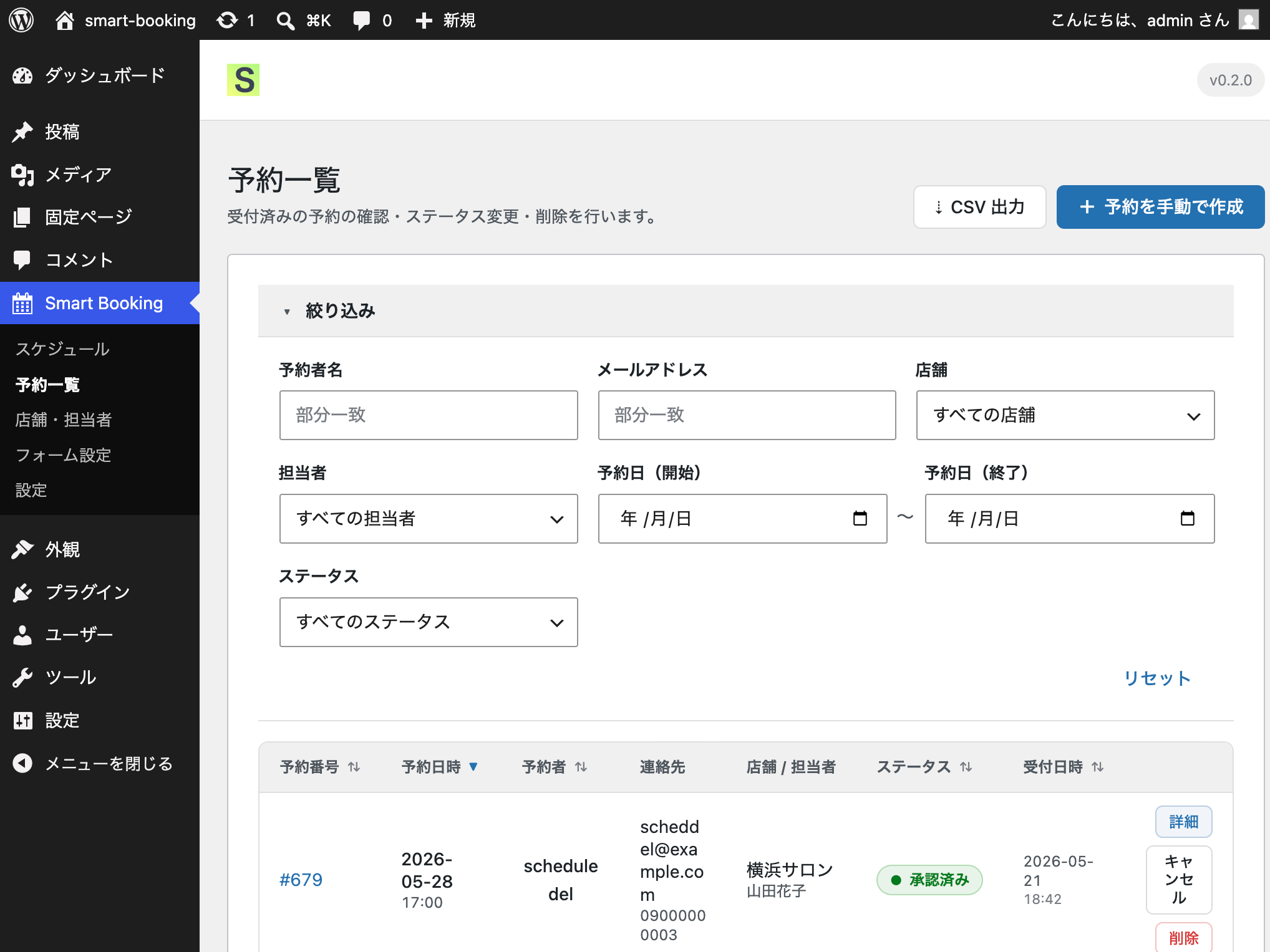
はい。予約一覧画面の「CSVエクスポート」ボタンから、現在絞り込んでいる予約をCSVファイルとしてダウンロードできます。
-
予約者に確認メールが届かない場合はどうすればよいですか?
-
メールの到達性は、ご利用のサーバーのメール送信環境に依存します。確実に届けるには、WP Mail SMTP などのSMTPプラグインを利用し、あわせて送信元ドメインのSPF・DKIM・DMARCを設定することを推奨します。直近の送信失敗は、管理画面の「設定 > メール通知」タブで確認できます。
-
プラグインを削除するとデータはどうなりますか?
-
WordPressの「削除」操作を実行すると、Smart Booking が作成した7つのカスタムテーブルと、すべてのオプションが削除されます。データを残したい場合は、プラグインを「削除」せず「停止」のみにしてください。
Reviews
There are no reviews for this plugin.
Contributors & Developers
“Smart Booking” is open source software. The following people have contributed to this plugin.
Contributors
Translate “Smart Booking” into your language.
Interested in development?
Browse the code, check out the SVN repository, or subscribe to the development log by RSS.
Changelog
0.4.1 – 2026-07-15
- 改善: フォーム設定画面に、選択中フォームの埋め込み用ショートコードの表示とコピーボタンを追加しました。
- 改善: 店舗一覧の各店舗に、店舗指定ショートコード(store_id)の表示とコピーボタンを追加しました。
0.4.0 – 2026-07-15
- 追加: 複数フォーム機能。「無料相談」「無料体験」など用途別に最大10個のフォームを作成し、ショートコード
[smart_booking form_id="2"]で使い分けられます。フォームごとに入力項目を設定でき、予約枠(スケジュール)は全フォームで共有されます。 - 追加: 予約一覧・CSVに「フォーム」列とフィルタを追加しました。
- 変更: 既存の入力項目と予約データは、アップデート時に自動的に「標準フォーム」に引き継がれます。
0.3.0 – 2026-07-14
- 追加: 「店舗」「担当者」の呼び方を設定画面から変更できるようになりました(例: サロン/先生)。予約フォームの表記に反映されます。
- 追加: 条件フィールド機能。ラジオボタン・セレクトボックスの選択値に応じて、他のフィールドの表示/非表示を切り替えられます。非表示のフィールドは必須チェックの対象外となり、入力値も保存されません。
- 追加: フィールドタイプ「住所」。郵便番号を入力すると住所が自動補完されます(zipcloud APIを使用。詳細はExternal servicesをご覧ください)。
0.2.3 – 2026-07-13
- 修正: スケジュールのコピー(上書き)が、対象外の店舗・担当者の空き枠まで削除・スキップしてしまう不具合を修正しました。コピーは指定した店舗・担当者の範囲だけに正しく限定されます。
- 修正: 同一の店舗・担当者・日付・時間帯に重複したスケジュールが作成され得る問題を修正しました(一意制約を追加。既存の重複は自動移行で解消し、予約は保持されます)。
- 修正: パーマリンク設定が「基本」の環境で、予約フォームや管理画面のREST通信が404になり動作しない不具合を修正しました(新規WordPressの既定設定で発生)。
- 改善: メール送信に失敗した場合に、管理画面「メール通知」タブで直近の失敗を確認できるようにしました(従来は失敗が表示されませんでした)。あわせてSMTP送信・SPF/DKIM/DMARC設定の手順ドキュメントを追加しました。
- 修正: 配布パッケージに管理画面のロゴ画像が含まれず表示されない不具合を修正しました。
- 修正: 時間枠の「残りわずか」が通常の空き枠と見分けられない表示不具合を修正しました(警告色とバッジを復元)。
0.2.2 – 2026-06-24
- 変更: WordPress.orgのレビューで指摘されたプレフィックスの一貫性に対応するため、データベースのプレフィックスを
smart_booking_に統一しました(従来はsmart_booking_とsmabo_が混在)。
0.2.1 – 2026-06-22
- 修正: readme.txt 内のChatWork URL(利用規約・プライバシーページ)を訂正しました。
- 改善: 配布パッケージから開発用ファイル(assets/)を除外しました。
- 追加: readme.txt にソースコードリポジトリのURLを記載しました。
- 改善: 他のプラグインへの影響を避けるため、uninstall.php でLIKEのワイルドカードを使わず、明示的なオプションリストを使用するようにしました。
- 変更: WordPress.orgの4文字プレフィックス要件を満たすため、データベースのプレフィックスを
smb_からsmabo_に変更しました。
0.2.0
- 予約フォーム、確認画面、完了画面のフロントUIを刷新しました。
- 店舗選択・担当者選択のカードレイアウトを改善しました(カード高さの統一、カード全体のクリック対応、ホバー状態)。
- 店舗・担当者を選択した後、その内容を保持して表示する「選択情報」バーを追加しました。
- 日付・時間枠選択の背景色のリグレッションを修正しました(選択状態が設定した色を正しく反映するようになりました)。
- レスポンシブ対応とE2Eテストスイートを拡充しました(ピッカー検証、確認・完了画面、レスポンシブレイアウト)。
- Googleカレンダー連携からデバッグログを削除しました。
- 各予約ステップ(
store_select、staff_select、date_select、time_select、form_input、confirm、complete)にGoogleタグマネージャー(GTM)のdataLayerイベントを追加し、GTM経由でGA4ファネルやGoogle広告のコンバージョンタグを設定できるようにしました。
0.1.0
- 初回リリース。
- 予約フォーム、店舗・担当者管理、スケジュール管理、予約一覧、フォーム設定、5タブ構成の設定画面。
- メール通知(予約受付・予約承認)。
- 任意のGoogleカレンダー連携(デフォルトはオフ)。
- 任意のChatWork通知(デフォルトはオフ)。