

Description
Features
Dynamic Content — Insert live data into any block using a simple template syntax: {{ post.title }}, {{ user.name }}, {{ site.name }}. No shortcodes, no PHP templates, no code.
Personalization — Greet visitors by name, show role-specific content, or display custom messages based on login status. Expressions are evaluated server-side on every page load.
Visibility Control — Show or hide any Gutenberg block based on conditions. Display content only for logged-in users, specific roles, or specific post states — all configured from the block sidebar.
Dynamic CSS Classes — Inject CSS classes into any block based on live data. Style blocks differently for administrators vs. guests, published vs. draft posts, and more.
20+ Built-in Filters — Transform values with chainable pipes: upper, lower, truncate, date, default, match, replace, kebab, and more. Chain them: {{ post.title | upper | truncate 20 }}.
Custom Fields — Access any post or user meta with post.meta.my_field or user.meta.my_field. Sensitive keys are blocked by default.
Full Expression Language — Arithmetic, comparison, ternary, logical operators, string interpolation, and bracket access. All evaluated server-side with zero frontend JavaScript.
In-Editor Autocomplete — Typing {{ triggers smart autocomplete with categorized suggestions, icons, and live previews.
Extensible — Register custom data roots, custom filters, and custom autocomplete suggestions via WordPress hooks and JavaScript filters.
For complete syntax reference, filter documentation, and developer guides, visit the full documentation.
How It Works
Add an expression to any block’s text content by typing {{ and selecting your expression from the autocomplete menu. The plugin will automatically format it as an expression chip.
{{ post.title }}
{{ user.name | default "Guest" }}
{{ post.date | date "F j, Y" }}
{{ user.is_logged_in ? "Welcome back!" : "Hello, visitor!" }}
Expressions are rendered as interactive chips in the editor and resolved server-side on every page render. No JavaScript runs on the frontend.
For the full syntax guide, data roots, and filter reference, see the documentation.
Source Code
The full, uncompressed source code is publicly available on GitHub.
Screenshots
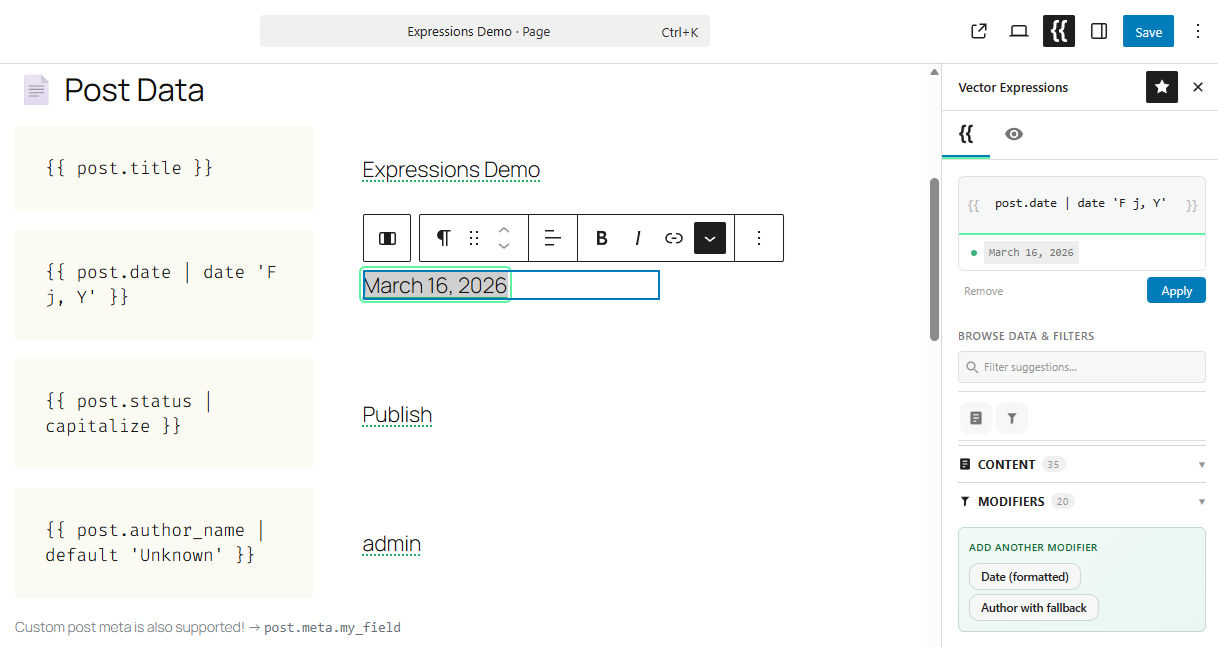
Expression editor with live previews — edit expressions in the sidebar and see resolved values in real time. 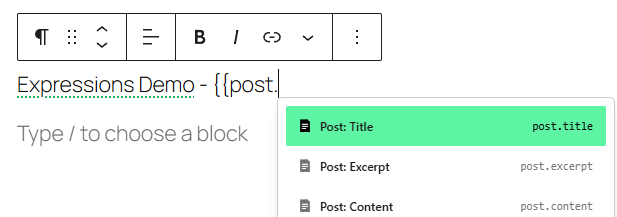
Autocomplete menu — type {{to browse data roots and insert expressions without memorizing syntax.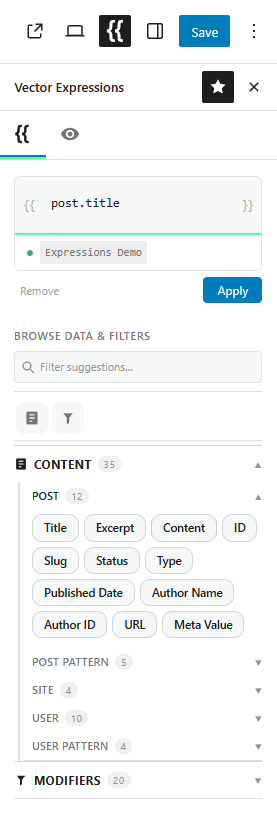
Suggestion browser — browse all available data roots, properties, and filters organized by category. 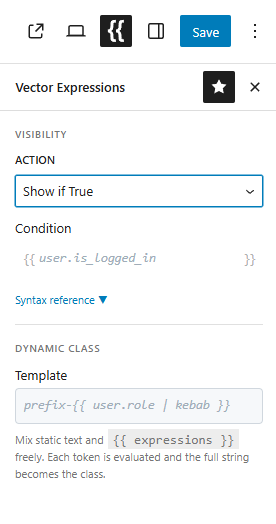
Visibility and dynamic class controls — show or hide any block based on conditions and inject CSS classes powered by expressions.
Installation
- Upload the plugin files to the
/wp-content/plugins/vector-expressionsdirectory, or install the plugin through the WordPress plugins screen directly. - Activate the plugin through the ‘Plugins’ screen in WordPress.
- Open the Block Editor and click the Vector ({{ braces) icon in the sidebar to access the Vector tab.
FAQ
-
Does this work with any block?
-
Yes. Expressions can be inserted into any block that uses Gutenberg’s standard RichText component — including paragraphs, headings, buttons, lists, and third-party blocks. Editor previews resolve automatically for these blocks. Blocks that don’t support previews are still processed and rendered on the frontend. A small number of code-oriented blocks (Code, Preformatted, HTML, Shortcode, Classic Editor) are excluded.
-
Is the content evaluated on the server or the client?
-
All expressions are evaluated server-side on every block render. There is no JavaScript on the frontend, so content is resolved before it reaches the visitor’s browser.
-
Can I use custom post meta or user meta?
-
Yes. Use
post.meta.my_fieldoruser.meta.my_fieldto access any registered meta field. Sensitive meta keys (containing “password”, “token”, “secret”, etc.) are blocked by default. -
Is this compatible with caching plugins?
-
Expressions that depend on the current user (e.g.,
user.name,user.is_logged_in) require per-user or no-cache handling. Post-only expressions (e.g.,post.title) are fully cache-safe. -
Can I extend it with my own data or filters?
-
Yes. Use PHP filters to register custom data roots and custom filter functions. Use JavaScript filters to add autocomplete suggestions in the editor. See the developer documentation for details.
Reviews
There are no reviews for this plugin.
Contributors & Developers
“Vector Expressions” is open source software. The following people have contributed to this plugin.
Contributors
Translate “Vector Expressions” into your language.
Interested in development?
Browse the code, check out the SVN repository, or subscribe to the development log by RSS.
Changelog
1.0.2
- Added:
post.author_namecomputed property — resolves author display name without exposingwp_usersinternals. - Added:
datefilter for formatting date strings with custom PHP date formats. -
Added: Explicit pattern categories in the suggestion accordion — patterns can now declare their own category instead of being auto-distributed by root.
-
Changed:
user.emailanduser.loginare now gated behindis_user_logged_in()— available for logged-in visitors (dashboard personalization),nullfor anonymous visitors. - Changed:
get_usermodifier no longer requireslist_userscapability — the property allowlist is the security boundary. - Changed: Restyled expression editor action buttons for improved visual hierarchy.
- Changed: Modifier architecture refactored into a base
Modifierclass andModifierSetregistry for cleaner extension patterns. -
Changed: Third-party developers can now inject expression completions at runtime via the
vector_expressions/editor/completionsJavaScript filter. -
Fixed: Removed direct user data hydration to prevent a race condition with
getCurrentUser()anduseEffectcleanup. - Fixed: Modifier category matching updated to use
endsWithwith optional chaining for improved flexibility. - Fixed: Documentation corrected:
post.urlnow accurately documented asget_permalink()(was incorrectly listed asguid), syntax table for{{{ }}}clarified aswp_kses_post().
1.0.1
- Added: Dedicated Vector sidebar tab in the block editor alongside Post and Block tabs.
- Added: Expression tab — clicking an in-content expression token opens the sidebar with a focused editor (input, live preview, apply/remove).
- Added: Accordion suggestions with searchable filter — categories auto-expand when searching.
- Added: Tabbed layout with per-tab content filters (
vectorExpressions.sidebar.tab.*). - Added:
vectorExpressions.sidebar.tabsfilter for extensions to register additional tabs. - Added:
vectorExpressions.suggestions.rootsfilter for extensions to register root categories. - Added:
vectorExpressions.suggestions.patternsfilter for extensions to add curated patterns. - Added:
vectorExpressions.suggestions.categoriesfilter for extensions to customize accordion sections. -
Added: Single-tab mode: when no extensions add tabs, content renders without the tab strip.
-
Changed: Expression editing moved from popover to sidebar — the floating popover is removed.
- Changed: Accordion categories are dynamically derived from completions data.
- Changed: Moved Visibility and Dynamic Class controls from the block inspector into the new sidebar.
-
Changed: Logic panel HOC is now UI-free — only handles pass1/pass2 token conversion.
-
Fixed: Invalid forward slashes in WordPress hook namespace arguments (
addFilter) replaced with dots — resolves React “Rendered fewer hooks than expected” crash on block selection.
1.0.0
- Added: Vector Expressions block format added to the Rich Text toolbar.
- Added: Expression pill editing popover with syntax highlighting.
- Added: Server-side parsing and evaluation engine for expressions.
- Added: Logic panel in block inspector for visibility and class expressions.
-
Added: Live preview evaluation via REST APIs.
-
Changed: Changed the core expression pill HTML tag from
<mark>to<span>. -
Fixed: Expression format now appears in core Button blocks and other blocks using
withoutInteractiveFormatting. Removedinteractive: truefrom format registration. - Fixed: Pressing Escape while editing an expression in the popover now reliably closes it.
- Fixed: Custom
vector/buttonblock now allows all registered rich-text formats (wasallowedFormats={[]}). -
Fixed:
render_block_logic:attrsis now always initialized as an empty array and guarded withis_array()before iteration. -
Features: Mustache-style expression syntax — Embed
{{ expression }},{{{ raw }}}, and{{-- comment --}}tokens directly inside any block’s text content. Evaluated server-side on every render. - Features: Dot-notation data access — Access WordPress data with simple, readable paths:
post.title,user.name,site.name. No need to know internal WordPress property names likepost_titleordisplay_name. - Features: Post, User & Site context roots — Three built-in data roots cover the most common dynamic content needs out of the box.
- Features: Custom field (meta) access — Read any post or user meta field with
post.meta.my_keyoruser.meta.my_key. - Features: Full expression language — Supports arithmetic (
+,-,*,/,%), comparison (==,!=,>,<), logical operators (&&,||), ternary expressions (condition ? a : b), dynamic bracket access (post["title"]), and inline string interpolation ("Hello {user.name}"). - Features: Built-in filters (pipes) — Transform values with a chainable filter syntax:
upper/uppercase,lower/lowercase,upper_first/capitalize,truncate,trim,replace,kebab,default,if,match,map,join,prop/get,get_post,get_user,get_meta,date,esc_html,esc_attr,raw, andrender. - Features: Block visibility control — Every Gutenberg block gains a Vector Logic panel. Set show/hide conditions with an expression evaluated per-render.
- Features: Dynamic CSS class — Append CSS classes to any block’s root element based on an expression result.
- Features: In-editor autocomplete — Typing
{{in the block editor triggers a smart autocomplete dropdown with categorised expression suggestions, icons, and preview snippets. - Features: In-editor expression chips — Inserted expressions are rendered as interactive inline chips in the editor, allowing quick edits and previews without hunting for raw text.
- Features: Excerpt rendering — Expressions in post content are evaluated before WordPress generates post excerpts, ensuring clean, parsed output in archive loops and REST responses.
- Features: Extensible via hooks — Register custom data roots, custom filter functions, custom autocomplete completions, and more via standard WordPress filters and JavaScript hooks.
-
Features:
WP_DEBUGerror comments — When debug mode is active, parse errors are surfaced as HTML comments (<!-- VE Error: ... -->) for easy troubleshooting. -
Added:
prop/getfilter — Access a property on the result of a pipeline filter without needing parentheses.{{ post.id | get_post | prop 'post_title' }}is now equivalent to{{ (post.id | get_post).post_title }}. - Added:
truncatefilter — Limit a string to N characters with an optional suffix (default…). Supports named args:{{ post.excerpt | truncate length=120 suffix='...' }}. - Added:
trimfilter — Strip whitespace or a custom character set:{{ value | trim }}/{{ value | trim '/' }}. - Added:
replacefilter — Find-and-replace:{{ post.title | replace 'Old' 'New' }}or with named argssearch=/replace=. - Added:
upper_first/capitalizefilter — Uppercase the first character only:{{ post.title | capitalize }}. - Added:
kebabfilter — Convert a string to a URL-safe kebab slug via WordPress’s nativesanitize_title():{{ post.title | kebab }}. - Added: Filter aliases —
uppercase(upper),lowercase(lower),capitalize(upper_first) for more readable expressions. - Added: Keyword meta deny list —
ObjectProxyandget_metanow block meta keys containing sensitive substrings (pass,token,secret,api_key,auth,nonce,salt,credential,private_key) as a defense-in-depth layer beyondis_protected_meta(). The list is filterable viavector_expressions/security/sensitive_meta_keywords. - Added:
vector_expressions/erroraction — Fires on every expression evaluation failure. Allows production error tracking (logging, Sentry, etc.) without exposing details in the frontend HTML. -
Added:
vectorExpressions.logicPanel.sectionsJS filter — Extension point for adding custom sections to the Vector Expressions inspector panel from JavaScript. Used by Pro to inject Dynamic Bindings UI. -
Fixed:
render_block_logic:attrsis now always initialized as an empty array and guarded withis_array()before iteration.