

Description
Date Picker for Gravity Forms is a simple yet powerful add-on that adds a fully customisable date picker field to your Gravity Forms. Let users select dates easily with a clean calendar UI — no manual typing, no formatting errors, no confusion.
Whether you’re building booking forms, appointment forms, event registration forms, or delivery date forms, this plugin gives you full control over how dates are selected and validated.
🔗 Pro Version | Documentation | Support
✅ Free Features
- Custom Date Format — Set your preferred date format (e.g. yy-mm-dd, dd/mm/yy, mm-dd-yy)
- Min Date Control — Set a minimum selectable date (e.g. current date, or X days from today)
- Max Date Control — Set a maximum selectable date to limit how far ahead users can book
- Responsive Design — Works perfectly on desktop, tablet, and mobile
- Easy Integration — Add the date picker field to any Gravity Form in seconds
- Theme Compatible — Works with any WordPress theme that supports Gravity Forms
- Localization Support — Supports multiple languages and international date formats
- Accessibility Ready — Built with accessibility in mind for all users
🔒 Pro Features
- Disable Specific Weekdays — Block Sunday, Monday, or any individual day of the week. Perfect for businesses closed on weekends or specific days.
- Disable Specific Dates — Block out holidays, unavailable days, or any specific dates or date ranges from the calendar.
- Active Dates Only — Restrict the calendar so users can only select from a predefined list of available dates. All other dates are disabled.
- Priority Support — Get direct help from the CodesMade development team.
📅 Perfect For
- Appointment booking forms
- Event registration forms
- Delivery date selection
- Hotel and rental booking forms
- Service scheduling forms
- Any form where users need to select a date
⚙️ How Pro Date Settings Work
Disable Week Days — Check the days you want to block. For example, check Saturday and Sunday to only allow weekday bookings.
Disable Dates — Enter specific dates or date ranges to block out. Format: 2026-03-04|2026-03-10. Separate multiple entries with a pipe | character.
Active Dates — Enter only the dates that should be selectable. All other dates will be disabled. Format: 2026-03-04|2026-03-10.
Min Date — Choose Current Date or set a custom number of days from today. Prevents users from selecting past dates.
Max Date — Choose Current Date or set a custom number of days ahead. Prevents bookings too far into the future.
🔌 Works With
- Gravity Forms 2.0 and higher
- All major WordPress themes
- All major browsers — Chrome, Firefox, Safari, Edge
More Plugins by CodesMade
- Date Picker For Contact Form 7 — Date picker add-on for Contact Form 7
- Autocomplete Location Field Contact Form 7 — Google Places location autocomplete for CF7
- Map Field For Contact Form 7 — Interactive map field for Contact Form 7
- Pixel Manager for Contact Form 7 — Add tracking pixels to CF7 forms
- Digital Signature for WPForms — Electronic signature field for WPForms
- AutoComplete Address Checkout For WooCommerce — Google Places address autocomplete for WooCommerce checkout
Screenshots
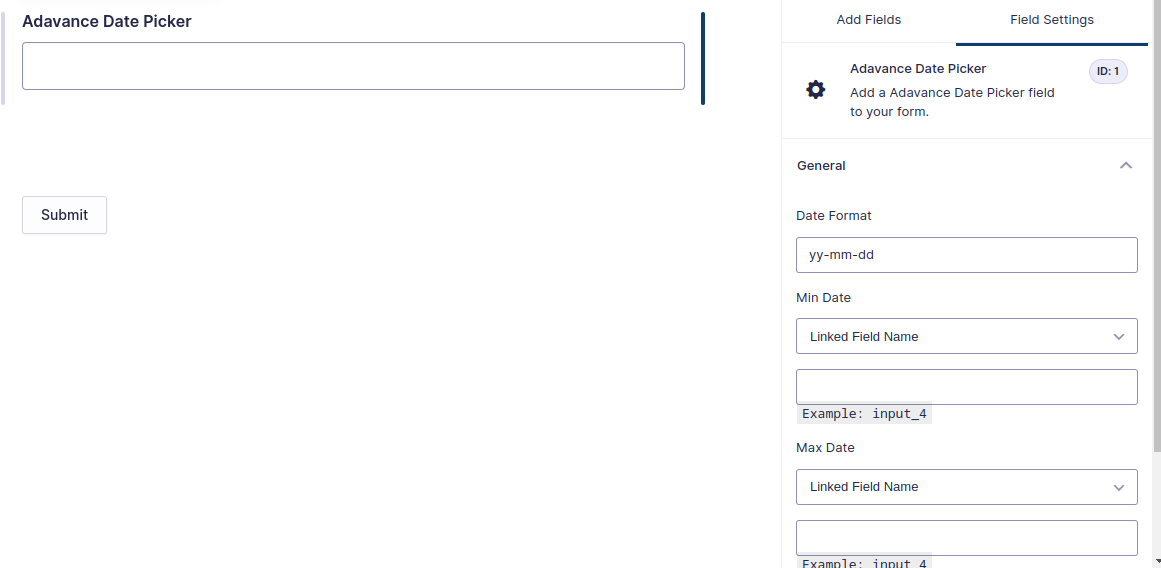
Date Picker field in the Gravity Forms editor — add and configure easily 
Date picker displayed on the front-end form — clean and user-friendly 
Date settings panel — configure format, min date, max date and Pro options
Installation
- Go to WordPress Admin Plugins Add New
- Search for Date Picker for Gravity Forms
- Click Install Now then Activate
- Open any form in the Gravity Forms editor
- Drag and drop the Date Picker field into your form
- Configure date format and min/max dates in the field settings
- Save and publish your form
Manual Installation
- Download the plugin ZIP file
- Go to WordPress Admin Plugins Add New Upload Plugin
- Upload the ZIP file and click Install Now
- Click Activate Plugin
FAQ
-
Does this plugin require Gravity Forms?
-
Yes. Gravity Forms must be installed and activated. This plugin adds a date picker field as a Gravity Forms add-on.
-
Can I disable specific days of the week?
-
Disabling specific weekdays is a Pro feature. Upgrade to Pro to block any individual day of the week such as Saturday and Sunday.
-
Can I block out specific dates like holidays?
-
Blocking specific dates is a Pro feature. Upgrade to Pro to disable individual dates or date ranges using the format
2026-03-04|2026-03-10. -
Can I allow only specific dates to be selected?
-
Active Dates is a Pro feature. Upgrade to Pro to restrict the calendar to only your chosen available dates.
-
How do I set a minimum date so users cannot select past dates?
-
Set the Min Date option to Current Date in the field settings. You can also set a minimum of X days from today — useful for forms that require advance notice. This is available in the free version.
-
What date formats are supported?
-
Common formats include
yy-mm-dd,dd/mm/yy,mm/dd/yy,dd-mm-yyand more. Enter your preferred format in the Date Format field. -
Is the date picker mobile friendly?
-
Yes. The date picker is fully responsive and works on all screen sizes including smartphones and tablets.
-
Is this compatible with all browsers?
-
Yes. The plugin works with all major browsers including Chrome, Firefox, Safari, and Edge.
-
Can I use this on multiple forms?
-
Yes. You can add the date picker field to as many Gravity Forms as you need.
-
Does the plugin support time selection?
-
Currently the plugin focuses on date selection only. Time selection is planned for a future update.
-
Where can I get support?
-
Free support is available via the WordPress.org support forum. Pro users get priority support at codesmade.com/contact-us.
Reviews
There are no reviews for this plugin.
Contributors & Developers
“Date Picker for Gravity Forms” is open source software. The following people have contributed to this plugin.
Contributors
Translate “Date Picker for Gravity Forms” into your language.
Interested in development?
Browse the code, check out the SVN repository, or subscribe to the development log by RSS.
Changelog
1.3
- Improved min date and max date controls
- Added Active Dates support (Pro)
- Performance improvements
1.0
- Initial release
- Date picker field for Gravity Forms
- Custom date format support
- Min date and max date controls
- Disable weekdays feature (Pro)
- Disable specific dates feature (Pro)